一、本文介绍
本文给大家带来的最新改进机制是2024最新高效 上采样 模块 EUCB ,EUCB 用于逐步上采样 特征图 ,使其尺寸和分辨率与后续跳跃连接相匹配。这种对齐增强了不同层级和阶段间的信息融合(这个模块对于分割网络效果更佳), EUCB 首先进行上采样操作 ,将输入特征图的尺度放大 2 倍,然后应用 DWC,接着进行批归一化(BN)和 ReLU 激活,这些步骤能够在不增加显著计算开销的情况下高效地增强特征图。最后进行 1x1 卷积以减少通道数,使上采样后的特征图与下一阶段的通道数相匹配,这对于解码路径中的平滑集成至关重要, 本文内容为独家整理, 同时该结构可以和其他Neck结构进行融合形成二次创新。
欢迎大家订阅我的专栏一起学习YOLO!

目录
二、原理介绍

论文地址: 官方论文地址
代码地址: 官方代码地址

Efficient Up-Convolution Block (EUCB) 机制的主要原理:
1. 目的和功能:
- EUCB 用于逐步上采样特征图,使其尺寸和 分辨率 与后续跳跃连接相匹配。这种对齐增强了不同层级和阶段间的信息融合,对于在分割过程中保持空间一致性至关重要。2. 核心过程:
- EUCB 机制首先进行上采样操作,将输入特征图的尺度放大 2 倍。
- 然后应用 3x3 深度卷积(DWC),接着进行批归一化(BN)和 ReLU 激活,这些步骤能够在不增加显著计算开销的情况下高效地增强特征图。
- 最后进行 1x1 卷积以减少通道数,使上采样后的特征图与下一阶段的通道数相匹配,这对于解码路径中的平滑集成至关重要。
3. 优势:
在 EUCB 中使用深度卷积实现高效计算,减少了标准 3x3 卷积通常带来的开销。这使得 EUCB 特别适合于对计算效率要求较高的应用场景,如便携式医疗影像系统。4. 总体影响:
EUCB 通过高效地进行多阶段特征聚合和精细化,帮助 EMCAD 在减少计算资源的同时,生成高质量、高分辨率的分割结果。
三、核心代码
核心代码的使用方式看章节四!
- import torch
- import torch.nn as nn
- from functools import partial
- import math
- from timm.models.layers import trunc_normal_tf_
- from timm.models.helpers import named_apply
-
- __all__ = ['EUCB']
-
-
- def gcd(a, b):
- while b:
- a, b = b, a % b
- return a
-
-
- # Other types of layers can go here (e.g., nn.Linear, etc.)
- def _init_weights(module, name, scheme=''):
- if isinstance(module, nn.Conv2d) or isinstance(module, nn.Conv3d):
- if scheme == 'normal':
- nn.init.normal_(module.weight, std=.02)
- if module.bias is not None:
- nn.init.zeros_(module.bias)
- elif scheme == 'trunc_normal':
- trunc_normal_tf_(module.weight, std=.02)
- if module.bias is not None:
- nn.init.zeros_(module.bias)
- elif scheme == 'xavier_normal':
- nn.init.xavier_normal_(module.weight)
- if module.bias is not None:
- nn.init.zeros_(module.bias)
- elif scheme == 'kaiming_normal':
- nn.init.kaiming_normal_(module.weight, mode='fan_out', nonlinearity='relu')
- if module.bias is not None:
- nn.init.zeros_(module.bias)
- else:
- # efficientnet like
- fan_out = module.kernel_size[0] * module.kernel_size[1] * module.out_channels
- fan_out //= module.groups
- nn.init.normal_(module.weight, 0, math.sqrt(2.0 / fan_out))
- if module.bias is not None:
- nn.init.zeros_(module.bias)
- elif isinstance(module, nn.BatchNorm2d) or isinstance(module, nn.BatchNorm3d):
- nn.init.constant_(module.weight, 1)
- nn.init.constant_(module.bias, 0)
- elif isinstance(module, nn.LayerNorm):
- nn.init.constant_(module.weight, 1)
- nn.init.constant_(module.bias, 0)
-
-
- def act_layer(act, inplace=False, neg_slope=0.2, n_prelu=1):
- # activation layer
- act = act.lower()
- if act == 'relu':
- layer = nn.ReLU(inplace)
- elif act == 'relu6':
- layer = nn.ReLU6(inplace)
- elif act == 'leakyrelu':
- layer = nn.LeakyReLU(neg_slope, inplace)
- elif act == 'prelu':
- layer = nn.PReLU(num_parameters=n_prelu, init=neg_slope)
- elif act == 'gelu':
- layer = nn.GELU()
- elif act == 'hswish':
- layer = nn.Hardswish(inplace)
- else:
- raise NotImplementedError('activation layer [%s] is not found' % act)
- return layer
-
-
- def channel_shuffle(x, groups):
- batchsize, num_channels, height, width = x.data.size()
- channels_per_group = num_channels // groups
- # reshape
- x = x.view(batchsize, groups,
- channels_per_group, height, width)
- x = torch.transpose(x, 1, 2).contiguous()
- # flatten
- x = x.view(batchsize, -1, height, width)
- return x
-
-
- # Multi-scale depth-wise convolution (MSDC)
- class MSDC(nn.Module):
- def __init__(self, in_channels, kernel_sizes=3, stride=1, activation='relu6', dw_parallel=True):
- super(MSDC, self).__init__()
-
- self.in_channels = in_channels
- self.kernel_sizes = kernel_sizes
- self.activation = activation
- self.dw_parallel = dw_parallel
-
- self.dwconvs = nn.ModuleList([
- nn.Sequential(
- nn.Conv2d(self.in_channels, self.in_channels, kernel_size, stride, kernel_size // 2,
- groups=self.in_channels, bias=False),
- nn.BatchNorm2d(self.in_channels),
- act_layer(self.activation, inplace=True)
- )
- for kernel_size in self.kernel_sizes
- ])
-
- self.init_weights('normal')
-
- def init_weights(self, scheme=''):
- named_apply(partial(_init_weights, scheme=scheme), self)
-
- def forward(self, x):
- # Apply the convolution layers in a loop
- outputs = []
- for dwconv in self.dwconvs:
- dw_out = dwconv(x)
- outputs.append(dw_out)
- if self.dw_parallel == False:
- x = x + dw_out
- # You can return outputs based on what you intend to do with them
- return outputs
-
-
-
-
- # Efficient up-convolution block (EUCB)
- class EUCB(nn.Module):
- def __init__(self, in_channels, kernel_size=3, stride=1, activation='relu'):
- super(EUCB, self).__init__()
-
- self.in_channels = in_channels
- self.out_channels = in_channels
- self.up_dwc = nn.Sequential(
- nn.Upsample(scale_factor=2),
- nn.Conv2d(self.in_channels, self.in_channels, kernel_size=kernel_size, stride=stride,
- padding=kernel_size // 2, groups=self.in_channels, bias=False),
- nn.BatchNorm2d(self.in_channels),
- act_layer(activation, inplace=True)
- )
- self.pwc = nn.Sequential(
- nn.Conv2d(self.in_channels, self.out_channels, kernel_size=1, stride=1, padding=0, bias=True)
- )
- self.init_weights('normal')
-
- def init_weights(self, scheme=''):
- named_apply(partial(_init_weights, scheme=scheme), self)
-
- def forward(self, x):
- x = self.up_dwc(x)
- x = channel_shuffle(x, self.in_channels)
- x = self.pwc(x)
- return x
-
-
-
- if __name__ == "__main__":
- # Generating Sample image
- image_size = (1, 64, 240, 240)
- image = torch.rand(*image_size)
-
- # Model
- mobilenet_v1 = EUCB(64)
-
- out = mobilenet_v1(image)
- print(out.size())
四、手把手教你添加EUCB
4.1 修改一
第一还是建立文件,我们找到如下 ultralytics /nn文件夹下建立一个目录名字呢就是'Addmodules'文件夹( !然后在其内部建立一个新的py文件将核心代码复制粘贴进去即可。

4.2 修改二
第二步我们在该目录下创建一个新的py文件名字为'__init__.py'( ,然后在其内部导入我们的检测头如下图所示。

4.3 修改三
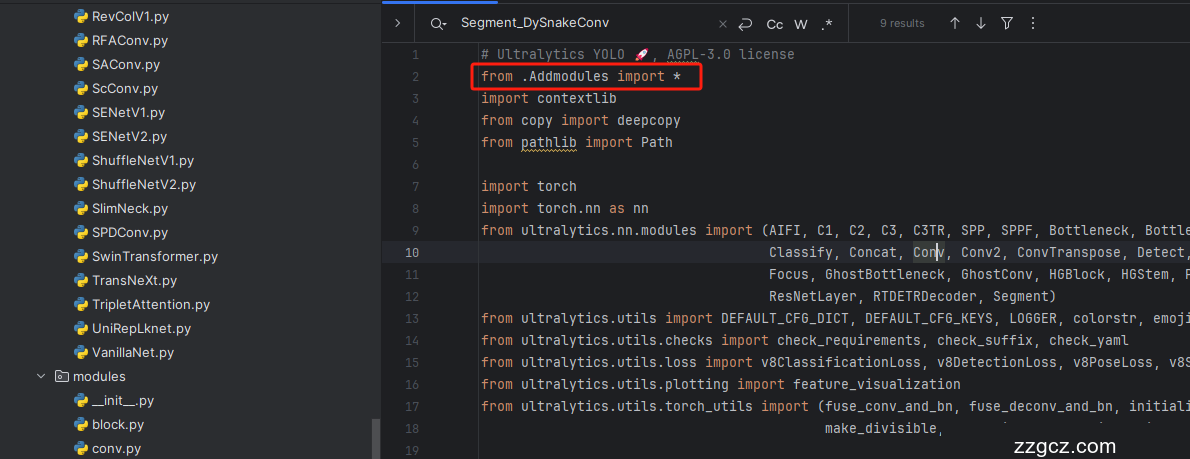
第三步我门中到如下文件'ultralytics/nn/tasks.py'进行导入和注册我们的模块( !
4.4 修改四
按照我的添加在parse_model里添加即可。

到此就修改完成了,大家可以复制下面的yaml文件运行。
五、正式训练
5.1 yaml文件1
训练信息:YOLO11-EUCB summary: 333 layers, 2,676,563 parameters, 2,676,547 gradients, 6.9 GFLOPs
- # Ultralytics YOLO 🚀, AGPL-3.0 license
- # YOLO11 object detection model with P3-P5 outputs. For Usage examples see https://docs.ultralytics.com/tasks/detect
-
- # Parameters
- nc: 80 # number of classes
- scales: # model compound scaling constants, i.e. 'model=yolo11n.yaml' will call yolo11.yaml with scale 'n'
- # [depth, width, max_channels]
- n: [0.50, 0.25, 1024] # summary: 319 layers, 2624080 parameters, 2624064 gradients, 6.6 GFLOPs
- s: [0.50, 0.50, 1024] # summary: 319 layers, 9458752 parameters, 9458736 gradients, 21.7 GFLOPs
- m: [0.50, 1.00, 512] # summary: 409 layers, 20114688 parameters, 20114672 gradients, 68.5 GFLOPs
- l: [1.00, 1.00, 512] # summary: 631 layers, 25372160 parameters, 25372144 gradients, 87.6 GFLOPs
- x: [1.00, 1.50, 512] # summary: 631 layers, 56966176 parameters, 56966160 gradients, 196.0 GFLOPs
-
- # YOLO11n backbone
- backbone:
- # [from, repeats, module, args]
- - [-1, 1, Conv, [64, 3, 2]] # 0-P1/2
- - [-1, 1, Conv, [128, 3, 2]] # 1-P2/4
- - [-1, 2, C3k2, [256, False, 0.25]]
- - [-1, 1, Conv, [256, 3, 2]] # 3-P3/8
- - [-1, 2, C3k2, [512, False, 0.25]]
- - [-1, 1, Conv, [512, 3, 2]] # 5-P4/16
- - [-1, 2, C3k2, [512, True]]
- - [-1, 1, Conv, [1024, 3, 2]] # 7-P5/32
- - [-1, 2, C3k2, [1024, True]]
- - [-1, 1, SPPF, [1024, 5]] # 9
- - [-1, 2, C2PSA, [1024]] # 10
-
- # YOLO11n head
- head:
- - [-1, 1, EUCB, []]
- - [[-1, 6], 1, Concat, [1]] # cat backbone P4
- - [-1, 2, C3k2, [512, False]] # 13
-
- - [-1, 1, EUCB, []]
- - [[-1, 4], 1, Concat, [1]] # cat backbone P3
- - [-1, 2, C3k2, [256, False]] # 16 (P3/8-small)
-
- - [-1, 1, Conv, [256, 3, 2]]
- - [[-1, 13], 1, Concat, [1]] # cat head P4
- - [-1, 2, C3k2, [512, False]] # 19 (P4/16-medium)
-
- - [-1, 1, Conv, [512, 3, 2]]
- - [[-1, 10], 1, Concat, [1]] # cat head P5
- - [-1, 2, C3k2, [1024, True]] # 22 (P5/32-large)
-
- - [[16, 19, 22], 1, Detect, [nc]] # Detect(P3, P4, P5)
5.2 训练代码
大家可以创建一个py文件将我给的代码复制粘贴进去,配置好自己的文件路径即可运行。
- import warnings
- warnings.filterwarnings('ignore')
- from ultralytics import YOLO
-
- if __name__ == '__main__':
- model = YOLO('模型配置文件')
- # 如何切换模型版本, 上面的ymal文件可以改为 yolov8s.yaml就是使用的v8s,
- # 类似某个改进的yaml文件名称为yolov8-XXX.yaml那么如果想使用其它版本就把上面的名称改为yolov8l-XXX.yaml即可(改的是上面YOLO中间的名字不是配置文件的)!
- # model.load('yolov8n.pt') # 是否加载预训练权重,科研不建议大家加载否则很难提升精度
- model.train(data=r"C:\Users\Administrator\PycharmProjects\yolov5-master\yolov5-master\Construction Site Safety.v30-raw-images_latestversion.yolov8\data.yaml",
- # 如果大家任务是其它的'ultralytics/cfg/default.yaml'找到这里修改task可以改成detect, segment, classify, pose
- cache=False,
- imgsz=640,
- epochs=150,
- single_cls=False, # 是否是单类别检测
- batch=16,
- close_mosaic=0,
- workers=0,
- device='0',
- optimizer='SGD', # using SGD
- # resume='runs/train/exp21/weights/last.pt', # 如过想续训就设置last.pt的地址
- amp=True, # 如果出现训练损失为Nan可以关闭amp
- project='runs/train',
- name='exp',
- )
5.3 训练过程截图

五、本文总结
到此本文的正式分享内容就结束了,在这里给大家推荐我的YOLOv11改进有效涨点专栏,本专栏目前为新开的平均质量分98分,后期我会根据各种最新的前沿顶会进行论文复现,也会对一些老的改进机制进行补充,如果大家觉得本文帮助到你了,订阅本专栏,关注后续更多的更新~